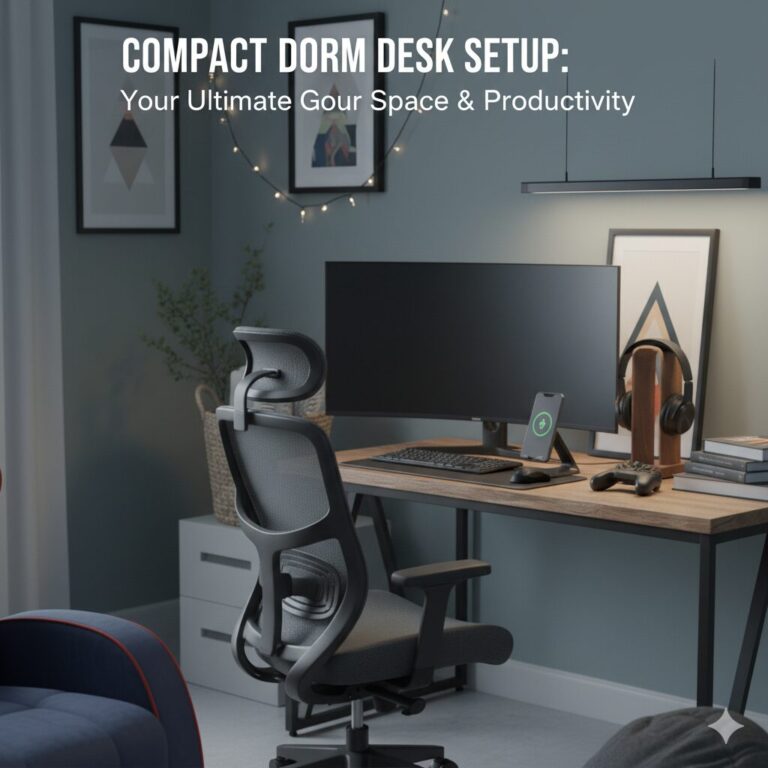
The Ultimate Guide to a Compact Dorm Desk Setup: Maximize Your Space & Productivity
Welcome to the art of dorm room engineering. Your desk isn’t just a piece of furniture; it’s the command center for your entire college life. It’s where you’ll cram for exams, write game-changing essays, dominate in late-night gaming sessions, and maybe even eat the occasional bowl of ramen. But in a room that’s already short on space, how do you create a setup that’s functional, organized, and actually a place you *want* to be?
As someone who survived a dorm room the size of a closet, I can tell you it’s a science. It’s about choosing smart, multi-functional pieces and using every vertical and horizontal inch to your advantage. This guide is your blueprint. We’re going beyond just picking a desk; we’re building a complete, high-efficiency workstation from the ground up, using battle-tested products that are perfect for tight quarters.
Complete Table of Contents
- Phase 1: The Foundation – Choosing the Right Compact Desk
- Standard Dorm Desk Assessment
- Key Measurements You Must Take
- Material Considerations
- Built-in Storage vs. Separate Organizers
- Phase 2: The Command Chair – Ergonomics in a Small Package
- Ergonomics Explained
- Space-Saving Chair Features
- Adjustability Requirements
- Maintenance and Cleaning
- Phase 3: Lighting Solutions – Beyond Basic Illumination
- Task Lighting Fundamentals
- Ambient Lighting Techniques
- Smart Lighting Integration
- Energy Efficiency Considerations
- Phase 4: The Organization System
- Cable Management Mastery
- Vertical Storage Solutions
- Digital Organization Tools
- Maintenance Routines
- Phase 5: Technology Integration
- Essential Tech Gear
- Multi-Monitor Setups
- Charging Station Creation
- Data Backup Systems
- Phase 6: Personalization and Comfort
- Ergonomic Accessories
- Personal Touches
- Comfort Items
- Plant Life Integration
- Budget Planning and Prioritization
- Maintenance and Daily Routines
- Frequently Asked Questions
Phase 1: The Foundation – Choosing the Right Compact Desk
Your desk is the centerpiece of your dorm room workstation. The standard-issue dorm desk is usually a clunky, immovable beast that often lacks the features modern students need. If you have the option to bring your own, doing so can significantly enhance your productivity and comfort. You’re looking for the trifecta: a small footprint, built-in storage, and sturdy construction. Forget massive executive desks; think lean, smart, and efficient.
Understanding Desk Dimensions: The Science of Space
Before you even start shopping, you need to become intimately familiar with your dorm room’s dimensions. Here’s what to measure:
Essential Measurements Checklist
- Wall Space: Measure the exact length of the wall where you plan to place the desk
- Depth Clearance: Account for chair space behind the desk (minimum 30 inches)
- Height Clearance: Consider any shelves or loft beds above
- Door Swing: Ensure the desk won’t block door movement
- Electrical Access: Map out outlet locations relative to desk placement
- Window Alignment: Consider natural light sources and glare
Desk Material Considerations for Dorm Life
The material of your desk affects not just aesthetics but also durability, weight, and maintenance:
| Material | Pros | Cons | Best For |
|---|---|---|---|
| MDF/Laminated | Lightweight • Affordable • Easy to clean • Modern finishes | Can warp with moisture • Not waterproof • Less durable | Budget-conscious students in dry climates |
| Solid Wood | Durable • Ages well • Repairable • Classic look | Heavy • Expensive • Requires maintenance | Students who value longevity and aesthetics |
| Metal Frame + Wood Top | Very stable • Industrial look • Easy to assemble • Modern | Can feel cold • May scratch floors • Less storage options | Modern setups needing maximum stability |
| Glass Top | Feels spacious • Easy to clean • Modern aesthetic | Fingerprints show • Can shatter • Cold surface | Small rooms needing visual lightness |
Pro Desk Selection Tip
Always choose a desk with rounded edges. This prevents painful bumps in tight spaces and reduces the risk of injury during late-night study sessions. Additionally, consider a desk with a slight matte finish rather than glossy – it shows fewer fingerprints and is easier to keep clean.
The Psychology of Desk Placement
Where you place your desk in your dorm room affects more than just traffic flow – it impacts your mental state and productivity:
Optimal Desk Placement Strategies

Coleshome Small Computer Desk (31-Inch)
Dorm Room Reality Check: This is the minimalist’s dream. At just 31 inches wide, it fits into the tightest corners without feeling flimsy. Its secret weapon is its simplicity, leaving you maximum legroom and space underneath for storage bins or a PC tower. The clean lines make your small space feel more open.
- Ultra-compact 31″ width perfect for corner placement
- Sturdy steel frame with crossbars prevents wobbling
- Dead-simple 15-minute assembly with clear instructions
- Minimalist design creates an illusion of space
- 29.5″ height is ideal for standard chairs
- 450 lb weight capacity handles heavy monitors
- Easy-to-clean surface resists stains and scratches

Cubiker Computer Desk with Storage Shelves (40-Inch)
Dorm Room Reality Check: If you’re fighting a losing battle against clutter, this desk is your reinforcements. The built-in side shelves are a game-changer for storing textbooks, notebooks, and supplies without taking up any precious desktop space. It’s a desk and a small bookshelf in one, which is peak dorm efficiency.
- Integrated 2-tier shelving unit holds 40+ pounds
- Shelves can be installed on left or right based on room layout
- 40-inch surface provides ample workspace for dual monitors
- Includes a handy storage bag on the side for quick access items
- Industrial-style metal frame ensures stability
- Easy assembly with color-coded parts and tools included
- Modern aesthetic works with any dorm decor
Additional Desk Recommendations for Specific Needs
Beyond our top picks, consider these specialized options:
Adjustable Height Desks: The Future of Studying
Consider an adjustable height desk (often called sit-stand desks). While they require more investment, the health benefits are substantial. Being able to change positions throughout the day prevents back pain, improves circulation, and can boost focus by up to 46%. Look for electric models with memory presets for quick height changes between sitting and standing.
Phase 2: The Command Chair – Ergonomics in a Small Package
You will spend hundreds of hours in this chair. Do not settle for the spine-breaking wooden chair provided by your university. A good chair improves focus, prevents back pain, and makes long study sessions bearable. The key is finding one with ergonomic support that doesn’t have the bulky footprint of a corporate CEO’s throne.
Your chair should support three key zones: lumbar (lower back), thoracic (mid-back), and cervical (neck). Proper alignment in these areas prevents the “student slouch” that leads to chronic pain. Look for chairs with adjustable lumbar support that can be positioned exactly where your spine needs it.
Before purchasing, measure the space behind your desk. You need at least 30 inches of clearance for the chair to move freely. Also consider the chair’s dimensions when pushed completely under the desk – this is crucial for maximizing floor space when not studying.
Quality casters are essential. Look for dual-wheel casters that roll smoothly on both carpet and hard floors. The chair should have a 360-degree swivel and smooth tilt mechanisms. Avoid chairs that feel “sticky” or require excessive force to adjust.
Pro Tip: Look for Flip-Up Arms
A chair with arms that flip up is a dorm room cheat code. It allows you to push the chair all the way under the desk when you’re done, instantly freeing up several square feet of floor space. For a deeper dive into seating, check out our complete guide to the best dorm chairs for guys.
Warning: Avoid Gaming Chair Traps
While gaming chairs look cool, many prioritize style over ergonomics. They often have aggressive lumbar pillows that don’t adjust properly and bucket seats that restrict movement. For actual long-term comfort during study sessions, traditional ergonomic office chairs typically provide better support and breathability.

Hbada Ergonomic Office Chair with Flip-up Arms
Dorm Room Reality Check: This chair perfectly balances dorm-sized proportions with serious ergonomic features. The flip-up arms are its superstar feature, but the breathable mesh back and built-in lumbar support are what will save you during finals week. It’s a high-performance academic tool disguised as a sleek chair.
- Space-saving flip-up arms that tuck completely away
- Ergonomic backrest with adjustable lumbar support
- Breathable mesh keeps you cool during long sessions
- 120° tilt tension with smooth recline mechanism
- 360-degree swivel with smooth-rolling dual-wheel casters
- Adjustable seat height from 17.3″ to 21.5″
- 275 lb weight capacity for durability
- Easy assembly with clear pictorial instructions
Chair Maintenance and Longevity Tips
To ensure your chair lasts through all four years of college:
Chair Care Checklist
- Weekly: Wipe down with damp cloth, check bolts for tightness
- Monthly: Vacuum mesh surfaces, lubricate moving parts
- Seasonally: Deep clean with appropriate cleaners
- Annually: Replace casters if worn, check hydraulic lift
Phase 3: The Lighting – Banish the Fluorescent Buzz
The harsh, soul-crushing overhead fluorescent light in most dorms is a recipe for eye strain and headaches. A dedicated desk lamp is not a suggestion; it’s a requirement. You need focused, high-quality light. Modern LED lamps offer adjustable brightness and color temperatures—perfect for shifting from intense study mode to a relaxed evening vibe.
The Science of Task Lighting
Proper desk lighting involves more than just turning on a lamp. It’s about creating an environment that supports visual comfort and reduces eye strain:
| Lighting Type | Best Use | Recommended Brightness | Color Temperature |
|---|---|---|---|
| Task Lighting | Reading, writing, detailed work | 450-800 lumens | 4000-5000K (cool white) |
| Ambient Lighting | General room illumination | 200-400 lumens | 2700-3000K (warm white) |
| Accent Lighting | Highlighting decor, mood setting | 50-200 lumens | RGB or variable |

AFROG LED Desk Lamp with Wireless Charger & USB Port
Dorm Room Reality Check: This isn’t just a lamp; it’s a desk hub. It provides phenomenal, customizable light while also charging your phone wirelessly and offering a USB port for your other gadgets. In a dorm, every item should pull double or triple duty, and this lamp is the MVP of multi-tasking. It declutters your desk by eliminating extra charging bricks.
- 5 lighting modes & 7 brightness levels for any task
- Built-in 10W wireless fast charger compatible with Qi devices
- USB charging port (5V/2A) for a second device
- Auto-off timer (60 min) for studying before bed
- Memory function remembers your last settings
- 180° adjustable gooseneck for precise light placement
- Energy-efficient LEDs last up to 50,000 hours
- Non-slip weighted base prevents tipping

Quntis Computer Monitor Light Bar
Dorm Room Reality Check: This is the most intelligent lighting solution for a tiny desk. It clips onto the top of your monitor, casting a perfect pool of light onto your workspace *without taking up a single square inch of desk surface*. The asymmetrical light design illuminates your desk without causing any glare on your screen. It feels like a pro-level upgrade.
- Zero footprint on your desk surface
- Eliminates screen glare completely with asymmetric design
- Adjustable brightness (10%-100%) and color temp (3000-6500K)
- USB-powered directly from your monitor or laptop
- Memory function saves your preferred settings
- Dimmer knob for precise light control
- Universal clip fits monitors 0.4-1.6 inches thick
- Built-in ambient light sensor for automatic adjustment
Finding a lamp that matches your style is also key to making the space feel like your own. For more inspiration, explore our curated list of cool lamps for dorm rooms that blend form and function.
Advanced Lighting Techniques
Take your lighting game to the next level with these professional techniques:
Combine task lighting (desk lamp), ambient lighting (overhead or floor lamp), and accent lighting (LED strips). This creates depth, reduces eye strain from single light sources, and allows you to adjust lighting based on activity.
Program your smart lights to follow your natural sleep-wake cycle: cooler, brighter light in the morning for alertness, gradually warming and dimming in the evening to signal your body to prepare for sleep.
Divide your desk into zones: primary task area (brightest), secondary reference area (medium), and peripheral area (dim). This focused approach reduces visual fatigue during long study sessions.
Phase 4: The Organization – Taming the Chaos
A cluttered desk leads to a cluttered mind. With limited surface area, you have to think vertically. Desk organizers, monitor stands, and cable management tools are your best friends. They transform a messy pile into a streamlined, functional workspace.
Think Vertically!
Your desk surface is precious real estate. Use wall grids, pegboards (if allowed), or stacked organizers to get paper, pens, and supplies off the desk and onto the wall or a higher level. This is the core principle behind all great space-saving dorm storage solutions.
Cable Management Masterclass
Proper cable management is what separates amateur setups from professional ones. Here’s a complete system:
Start by unplugging everything. Identify essential cables and eliminate duplicates or rarely used items. Label each cable with its purpose using tags or colored tape.
Route cables along desk legs and edges. Use adhesive cable clips every 6-8 inches to maintain neat lines. Group similar cables together (power, data, audio).
Use cable sleeves or raceways to bundle and hide cables. Leave service loops for movement but avoid excess slack. Use cable combs for visible cables to maintain parallel alignment.

HUANUO Monitor Stand Riser with Drawer & Side Pockets
Dorm Room Reality Check: Lifting your monitor does two crucial things: it raises the screen to an ergonomic eye level and it instantly creates a new storage tier underneath. This stand is brilliant because it adds a drawer for hiding clutter and side pockets for your phone and pens. It’s a simple plastic stand that punches way above its weight in organizational power.
- Raises monitor 4.3 inches for perfect ergonomic alignment
- Creates storage space underneath for keyboard or notebooks
- Pull-out drawer with smooth gliding mechanism
- Side organizers hold phones, pens, and small accessories
- Slots for holding a tablet or phone vertically while charging
- Supports up to 44 lbs – stable for large monitors
- Cable management holes keep wires organized
- Non-slip pads protect both monitor and desk surface
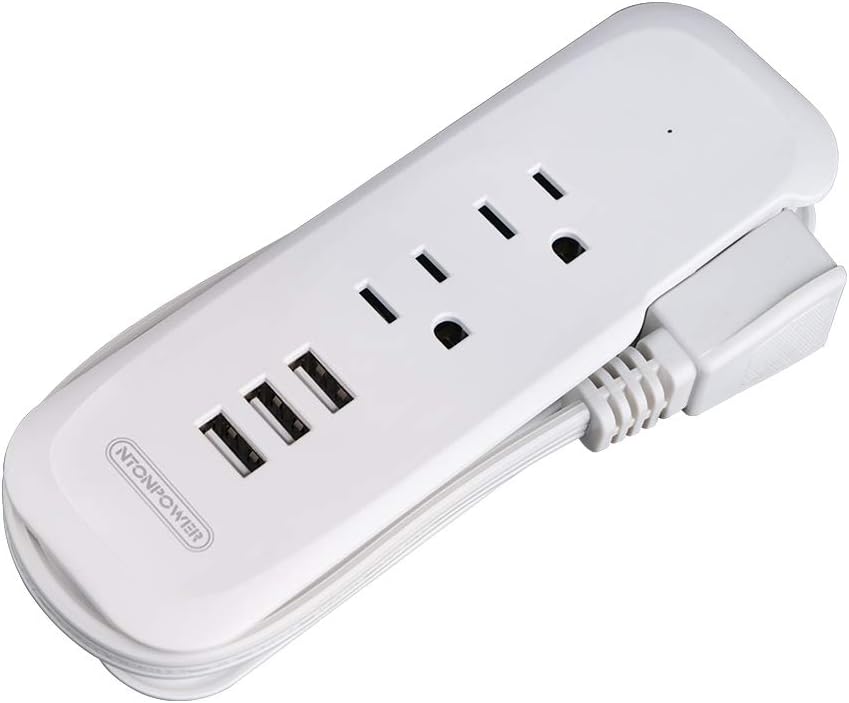
NTONPOWER Donut Power Strip with USB & Short Cord
Dorm Room Reality Check: A tangle of cables is the fastest way to make a desk feel messy. This compact, travel-friendly power “donut” is perfect for a desk. The short cord prevents excess cable spaghetti, and the circular design provides easy access to outlets and USB ports from any angle. It’s designed for tight spaces and keeps your power supply neat and tidy.
- Unique, space-saving circular design (4.3″ diameter)
- 3 AC outlets with safety shutters
- 3 USB ports (total 3.1A output)
- Short 15-inch cord reduces desk clutter
- Can be mounted with included adhesive for under-desk installation
- Surge protection (450 Joules) for device safety
- Child safety covers on all outlets
- Compact size fits in any desk organizer
Digital Organization Systems
Physical clutter often mirrors digital clutter. Implement these digital organization systems:
Digital Organization Protocol
- File Structure: Create semester → class → assignment type folder hierarchy
- Naming Convention: Use YYYY-MM-DD_Description format for all files
- Cloud Sync: Set up automatic backup to Google Drive or Dropbox
- Desktop Management: Keep desktop clean, use virtual desktops for different projects
- Bookmark Organization: Create folders by subject and priority
Phase 5: Technology Integration
Modern studying requires modern tech. But in a small space, you need to choose your technology wisely and integrate it seamlessly.
Essential Tech Gear for Dorm Desks
These are the non-negotiables for a productive tech setup:

Rain Design mStand Laptop Stand
Dorm Room Reality Check: This isn’t just a stand; it’s an ergonomic necessity. By raising your laptop screen to eye level, it prevents neck strain during long study sessions. The open design allows for optimal airflow, preventing overheating. Plus, it creates storage space underneath for notebooks or a keyboard.
- Elevates laptop to perfect eye level (5.5″ height)
- Solid aluminum construction with rubberized grips
- Cable management cutout keeps charger organized
- Open design maximizes airflow for cooling
- Non-slip base prevents movement during typing
- Works with laptops from 11″ to 17″
- Minimalist design complements any decor
- Doubles as a monitor stand in dual-screen setups

Anker 7-in-1 USB C Hub with 4K HDMI
Dorm Room Reality Check: Modern laptops sacrifice ports for thinness. This hub restores all the connections you need without cable chaos. Connect monitors, external drives, SD cards, and more through a single cable. It’s the ultimate expansion solution for space-constrained setups.
- 4K HDMI port for external monitor connection
- 2 USB 3.0 ports for peripherals and drives
- SD and microSD card readers for photographers
- 100W USB-C Power Delivery pass-through charging
- Compact design doesn’t block adjacent ports
- Aluminum body dissipates heat effectively
- Plug-and-play – no drivers required
- Backward compatible with USB-C and Thunderbolt 3
Creating a Charging Station
A dedicated charging area prevents cable chaos and ensures your devices are always ready:
Choose an area away from your main workspace – perhaps on a shelf or in a drawer. This separates charging clutter from work area. Ensure adequate ventilation for devices.
Invest in a multi-port GaN charger. These are compact yet powerful enough to charge multiple devices simultaneously. Look for at least 65W total output with Power Delivery.
Use a charging station organizer with cable channels. Label each cable with its device. Use short cables (6-12 inches) to minimize slack and tangling.
Phase 6: Personalization and Comfort
Your desk should inspire productivity but also reflect your personality. The right personal touches can make a sterile dorm room feel like home.
Ergonomic Accessories That Matter
These small investments pay huge dividends in comfort:

Glorious PC Gaming Race Keyboard Wrist Rest
Dorm Room Reality Check: This memory foam wrist rest is a game-changer for anyone who types for hours. It maintains neutral wrist alignment, preventing carpal tunnel syndrome and reducing fatigue. The premium materials feel great and the non-slip base stays in place.
- Premium memory foam with cooling gel layer
- Water-resistant PVC leather surface
- Non-slip rubber base prevents movement
- Available in multiple sizes for any keyboard
- Easy to clean with damp cloth
- Improves typing posture immediately
- Reduces wrist strain during long sessions
- Available in various colors to match setup

Large Extended Gaming Mouse Pad (35.4″x15.7″)
Dorm Room Reality Check: This oversized desk mat serves multiple functions: it protects your desk surface, provides smooth mouse tracking, dampens keyboard noise, defines your workspace area, and adds aesthetic appeal. It’s one of the most cost-effective upgrades you can make.
- Water-resistant surface repels spills
- Non-slip rubber base stays in place
- Premium stitching prevents fraying
- Optimized surface for precise mouse tracking
- Reduces keyboard noise for quiet studying
- Easy to clean with mild soap and water
- Available in hundreds of designs
- Protects desk from scratches and heat marks
The Power of Plants
Adding greenery to your desk setup has proven benefits:
Benefits of Desk Plants
Studies show that plants in workspaces can increase productivity by 15%, reduce stress levels, and improve air quality. They also add life and color to sterile dorm environments. Choose low-maintenance options like snake plants, pothos, or ZZ plants that thrive in indoor conditions with minimal care.
Budget Planning and Prioritization
Creating your perfect dorm desk setup doesn’t have to break the bank. Here’s how to allocate your budget wisely:
Priority 1: Chair & Desk (60% of budget)
These are long-term investments. Don’t skimp here.
Priority 2: Lighting & Organization (25% of budget)
Essential for productivity and space efficiency.
Priority 3: Personalization & Tech (15% of budget)
These can be added gradually as funds allow.
Maintenance and Daily Routines
A perfect setup requires consistent maintenance. Implement these routines:
At the end of each study session: wipe down surfaces, return items to their designated homes, straighten cables, and charge devices. This ensures you start fresh each time.
Once a week: disinfect surfaces, clean monitor screen, dust all surfaces, vacuum around desk, check cable organization, and assess what needs reorganization.
Once a month: evaluate what’s working, remove unused items, update digital organization, back up important files, and plan any needed upgrades or changes.
Frequently Asked Questions
Final Pro Tip: Start Simple, Then Optimize
Don’t try to build your perfect setup all at once. Start with the essentials (desk, chair, basic lighting), use the setup for a few weeks to identify pain points, then make targeted improvements. Your needs will evolve throughout the semester, so build flexibility into your system. The most successful setups are those that can adapt to changing requirements.
Conclusion: Your Blueprint for Success
Creating the perfect compact dorm desk setup is both an art and a science. It requires careful planning, smart purchasing decisions, and ongoing maintenance. But the payoff is enormous: improved productivity, better health, and a personal space that supports your academic success.
Remember these key principles:
- Ergonomics First: Comfort enables productivity
- Vertical Thinking: Maximize every cubic inch
- Multi-Functional Items: Every piece should serve multiple purposes
- Cable Management: A tidy setup promotes a clear mind
- Personalization: Make the space uniquely yours
Building the perfect compact dorm desk is the first step. To see how these pieces fit into the bigger picture, be sure to check out our master list of the best dorm room accessories for guys to complete your entire room setup. Your dorm room should be more than just a place to sleep – it should be a command center for success, and your desk is mission control.
Start with the basics, build gradually, and don’t be afraid to iterate. The perfect setup is one that evolves with you throughout your college journey. Now go forth and engineer your perfect workspace!